For the times you can’t be there to help
Tuno is the patient, personal tech helper that lives on their computer. It gives someone you care about plain-English help whenever they want it, without waiting for you to be free.
For the questions that can't wait until Sunday.
When your mum or dad is stuck on an email or the printer, they can ask Tuno on their Windows PC or laptop and be talked through it step by step. No waiting, no booking. They just ask. Once it is set up, help is a few clicks away. They stay in control.
For their Windows PC or laptop · Free for 14 days, no card needed · Then from £6.99 a month, or give it as a gift
Their 14-day free trial starts when they finish setting up Tuno: a taster of voice help (up to 30 minutes), plus typed help and email checks while the trial's help lasts. No card is needed, and nothing is charged unless you choose a plan.
Sound familiar?
- “The printer’s stopped working again.”
- “A pop-up says I’ve got a virus. Is that real?”
- “Where’s that email with my appointment details?”
- “Everything on the screen has moved and I don’t know why.”
You’re always glad to help. But questions don’t wait for a good moment, and you can’t always be on hand when one comes up. That’s what Tuno is for.
When an email, a text or a pop-up doesn’t look quite right, a calm second opinion at that moment is exactly what Tuno is for. Today’s scams are convincing enough to catch anyone out, and plenty still arrive by phone or at the door. Independent Age found that three in five people over 65 have been targeted, and that those who lose money lose around £4,000 on average.
Source: Independent Age, “The hidden cost of scams” (2024)
Help for them, peace of mind for you
Tuno is built for the person using it first: respectful, patient, and never condescending. The reassurance for family comes as a welcome side effect.
A second opinion before they click
When an odd email or pop-up appears, Tuno is there to look at it with them and explain what it actually is, before anything gets clicked, paid, or shared.
Everyday snags, sorted patiently
The printer, the settings, the missing email, the web page that makes no sense: Tuno talks them through it step by step, without waiting for your next visit.
Reassurance without watching
If they choose to connect you in the Family Portal, you see a short summary of each conversation and a monthly safety summary, such as “Tuno checked 12 emails and warned about 1 scam”, but never the conversation itself, word for word. They approve it, and they can switch it off any time.
They stay in charge
Tuno never takes the mouse and never takes over. It explains and encourages, and the person using it always does the clicking.
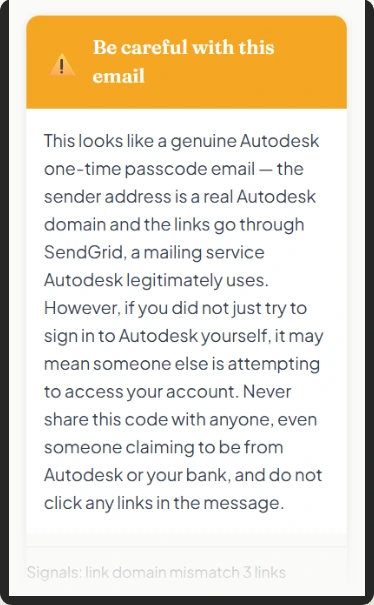
This is what your parent sees on their own computer when they ask Tuno about an email. They read it, then they decide.
The email is made up.
Your parent can try the free email checksWorth saying plainly: Tuno isn’t a monitoring tool, and it isn’t antivirus. It’s patient help and a trusted second opinion. The person using it stays in control of their computer, and of what you can see.
The gift of patience
You can give Tuno as a present, for a birthday, for Christmas, or just because. You pay once for a year and pass on a link. Their year starts when Tuno is set up on their Windows PC. You can give it now and set it up together when you’re next with them.
Giving Tuno, step by step
1. Choose Standard or Plus, from any device
Essentials £6.99 a month, Standard £14.99 a month or Plus £24.99 a month. A gift is a year of Standard or Plus, paid once, and it does not renew. You give us your email address and pay on our secure payment page. You can add your names and a short message after you pay. A phone, tablet or Mac is fine for this part.
2. Pass on the link
You get a gift link on the page after you pay, and by email. Send it in a message or print it on a card. If it isn’t used within 12 months, we refund it to your card automatically.
3. They make their own account and set it up
They open the link, choose their own password and install Tuno on their Windows PC, with you beside them or on the phone if they like. Then try a first question together: “Can you help me find an email from…?”
4. Their year starts when set-up is done
When set-up finishes, their year of Tuno starts. Nothing more is ever charged. Afterwards, Tuno asks whether they would like you to be kept updated. It is their choice, and nobody is linked unless they say yes.
How buying a plan for someone works
No ambiguity about whose account it is, who pays, or who’s in charge.
1
You pay, they own it
You handle the subscription and the billing, and only you can cancel it. The Tuno account itself belongs to your loved one: it's their email, their password, their computer.
2
They set their own password
After you sign up, your Family Portal lets you invite them by email. They click the link, choose their own password, and install Tuno on their PC. You never know their password, and they can choose to sign in with a fingerprint or PIN afterwards.
3
They stay in charge of what you see
They approve the family connection, and they can switch off family visibility at any time. Tuno works exactly the same whether it's on or off.
4
Sign up from any device
You can sign up, and later pay, from a Mac, phone, or tablet. Then send them the link so the one-minute sound check and the install happen on their Windows PC. They need to live in the UK and be happy using Tuno in English.
What family see, and what they never see
Shared with family
- A short summary of each conversation, written by Tuno
- A monthly safety summary: how many emails Tuno checked and warned about, and how many websites it warned about or blocked. Numbers only, never who or what
- Billing and subscription management for whoever pays
Always private
- The conversations themselves, word for word, voice or typed
- The other web pages they visit
- Anything on their screen
- Passwords, and anything they type into other apps
The person using Tuno approves this connection and can withdraw it whenever they like. The legal detail is in our Privacy Policy.
Sunday calls about more than the printer
Free for 14 days, no card needed. Family Portal included.